
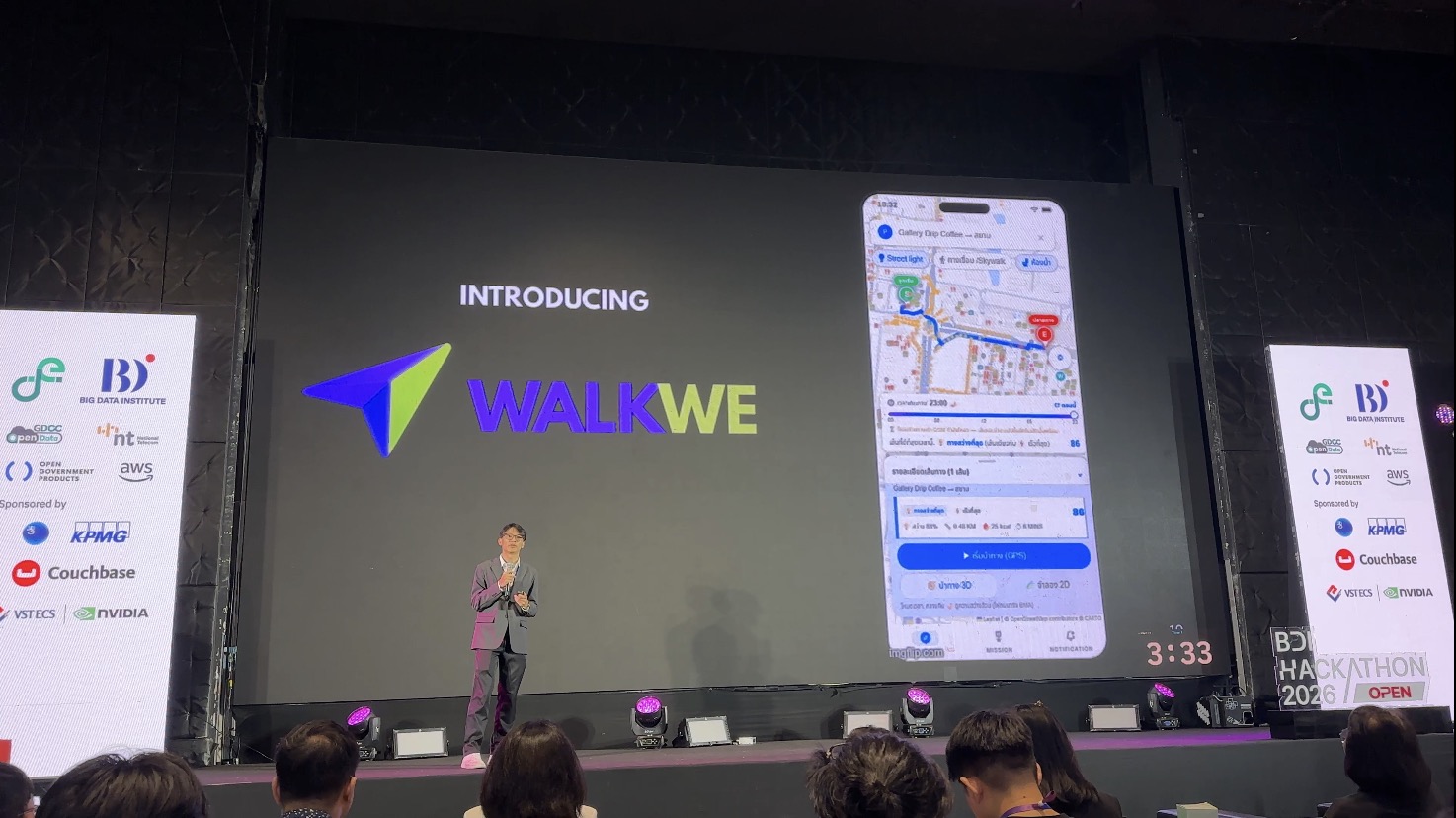
I just wrapped up participating in the BDI Hackathon 2026!
Throughout the camp, I jotted down as many notes as I could. Looking back at them, I thought to myself: this information is way too useful to just keep stored away. So, I decided to polish up my notes into an article to share what I learned with all of you!
Disclaimer: This article is a condensed summary of my personal notes, highlighting non-confidential insights written in my own words (and edited by AI). Because these reflect my personal understanding, there might be slight errors or misconceptions here and there. Please treat this as a casual personal reflection rather than an official document from any of the organizations mentioned.
Here is a quick overview of what I picked up across 5 workshops, teamwork sessions, and chats with fellow competitors:
- What is this Hackathon?
- Before we actually made something
- Tools for Application / AI development in 2026
- Rapid AI Prototyping
- Pitching 101
- Learning lessons form Demo day
If any of these topics catch your interest, follow along!

1. What is this Hackathon?
This hackathon was organized by the Big Data Institute (BDI) Thailand. Their goal in this hackathon was to foster practical innovation around:
- Using AI to solve real-world problems in Thailand.
- Applying Thai LLMs, Agentic AI, or multi-source data integration.
- Delivering tangible Proof-of-Concept (PoC), Prototype, or MVP demonstrations.
- Demonstrating clear User Validation and business/social value.
The competition was divided into 3 main tracks:
- Data for Better Journey (The track my team joined): Designing smart urban tools and decision assistants, leveraging traffic, weather, PM2.5, and event data to optimize city commuting, time management, and route selection.
- Data for Better Lifestyle
- Data for Better Safety
What Does BDI Do?

BDI connects national data assets and turns them into actionable policy intelligence focused on:
- Government data backbone
- Analytics for public policy
- Sovereign AI
They operate several key platforms:
- Health Link: Connects health records across hospitals.
- Travel Link: Aggregates traveler and tourism statistics.
- PF Link: Integrates environmental data.
For our project, we used datasets from BDI’s open data platform, Thackle. (I previously analyzed Bangkok public transportation data from this site, you can check out my full write-up at Public Transportation Usage in Thailand Analysis).
Thai LLM

Another cool initiative is ThaiLLM, an open, trusted Thai AI ecosystem partially contributed to by BDI. Unlike global models like GPT or Gemini, ThaiLLM models are foundation models fine-tuned specifically for the nuances of the Thai language and culture.
- Models: ThaiLLM on HuggingFace
- Datasets: ThaiLLM Data Repository
My Team
I joined the hackathon with my pharmacist friend. We were actually going through a data science bootcamp together and had previously teamed up for the Thai Parliament Datathon! BDI grouped us with three other talented members: two computer science students and an engineering student.

Early on, I stepped up into the team leader role: handling planning, conducting meetings, keeping us aligned on timelines, and reviewing final deliverables. To keep everything smooth and organized, I set up a Notion workspace with a progress dashboard and documentation pipeline.

We managed to build a demo of the pedestrian navigation app called WalkWe. The app provide three main features: shade routing (during the day), light routing (during the night), and micro routing through buildings and skywalk (in the Siam area).

Competition Format

- Proposal Round: 30 teams were selected across tracks.
- Soft Pitching: 21 teams moved forward to refine their prototypes.
- Demo Day: 5-minute final pitch on stage at Lido Connect, alongside interactive demo booths to showcase live working prototypes.
Along with the workshops, this project taught me a lot: from navigation tech (OpenStreetMap), survey design, and business development to UX/UI design in Figma and project management.
Next, I will walk you through sessions and experiences I gained form this event.
2. Before we actually made something

Before jumping into building apps or AI solutions, you have to ask yourself: Are we solving a real problem, or just what we assume is a problem?
Design Thinking
This session was led by K. Korawit Kwanaree, MAYDAY! Director who introduced us to the Design Thinking framework. While people from software or engineering backgrounds might already be familiar with it, as someone from a healthcare background, this was a refreshing structured approach for me!
Why Do We Need Design Thinking?
Thanks to AI, building a prototype today is faster than ever. Anyone can whip up a personal app for themselves or a friend over a weekend. But building solutions that solve large-scale problems for thousands of people is a completely different ballgame.
If you rush straight to the solution, you’ll likely waste time and resources building something nobody actually wants or uses. Design Thinking ensures you deeply understand user needs and test assumptions with real humans before writing a line of code.

(Source: https://www.programstrategyhq.com/post/design-thinking-process)
Here is a brief summary of the 4 main stages of design thinking:
- Empathize (Divergent): Open your mind to all possibilities and get to know your users deeply through literature reviews, real-world observations, interviews, and immersion.
- Our approach: We walked around Siam Square (our pilot area) to observe pedestrian bottlenecks firsthand and surveyed 159 Bangkok residents. We gathered feedback on dark alleys, blistering sun, broken footpaths, complex skywalks, flooding, and even street dogs and homeless safety concerns!
- Define (Convergent): Group and prioritize the pain points to pinpoint the core issue using tools like user journey mapping.
- Our approach: We categorized Bangkok pedestrian struggles into 6 main pain points: safety/dark alleys, heat, flooding, physical obstructions, lack of walking inspiration, and the need for convenience spots.
- Ideate (Divergent): Brainstorm creative solutions to address the defined pain point.
- Our approach: We decided to build a safe, pedestrian-first navigation application for Bangkok commuters.
- Prototype & Testing: Create a working version of the product, test it internally, and invite target users to test and give feedback.
From Idea to Product—Building What Actually Matters

This session was led by Vir Chiniwala and Gaille Teo from Open Government Products (OGP) in Singapore. OGP operates like a nimble tech startup inside the public sector, building impactful products like ScamShield (filtering scam calls/SMS), Isomer (government website builder), and Postman (mass communications). They also run the famous Hack for Public Good initiative.
Avoid the Product Failure Trap
Most product failures happen before writing any code: When teams pick a cool idea first and build features without validating if anyone needs them. A fancy presentation might look great on demo day, but without a real user pain point, the product has no long-term reason to exist.
Start with the Problem, Not the Idea
- ❌ Idea-First: “We need an AI platform to help citizens access public data.”
- ✅ Problem-First: “Small business owners cannot tell which public datasets are fresh enough to help them decide where to open a new shop.”
Applying the Framework
Here is how detailed framework applied with our project:
1. User Insights & Survey Data
Before finalizing our problem scope, we surveyed 159 Bangkok commuters and analyzed public transit habits:
- 85.5% walk at least 3–5 times per week to complete their journeys.
- Key Gender Distinction: Female commuters reported statistically significantly higher safety concerns in dark/unlit alleys compared to male respondents. Women also expressed greater concern over flooding, harsh sun, and isolated walkways.
- Walking Frequency & Motivations: Daily walking commuters were worried about all safety issues, but explicitly rejected gamified “walking points” incentives. Occasional walkers (1–2 times/week) were far more interested in incentive features.
2. Writing a Useful Problem Statement
A useful problem statement covers 4 key elements:
- User: Female office workers (ages 25–34) commuting in inner Bangkok.
- Job: Walking home safely from public transit stations (BTS/MRT) or connecting daily routes.
- Pain: Fear and anxiety when walking through dark, unlit alleys at night
- Cause: Inadequate or malfunctioning streetlights in inner city alleys, lack of publicly accessible real-time lighting data, and generic navigation tools (like Google Maps) only computing distance without considering walkability or light safety.
Our Problem Statement Formula:
“We are building a safety-focused navigation tool for women working in inner Bangkok who struggle with navigating dark, unlit alleys because street lighting data isn’t integrated into standard map navigators.”
3. Exploring the User Journey
We mapped our user’s experience across 4 phases:
- Discover: How does the commuter realize a route is unsafe before walking down it?
- Decide: What information (lighting levels, alley brightness, distance) do they compare to choose a path?
- Act: How do they navigate along the recommended safe route?
- Confirm: How do they verify they reached their destination safely?
4. Testing Product Assumptions & Risk-Evidence Matrix
Before building features, we evaluated what must be true for our product to matter:
| Low Evidence | High Evidence | |
|---|---|---|
| High Risk | Test First (Validate immediately!): • Assumption 1: Streetlight coverage is a reliable metric for perceived safety. • Assumption 2: Streetlight data is accurate and updated in real-time. | Design Around: • Incorporate verified city lighting data into navigation algorithms. |
| Low Risk | Leave Out: • Gamified voucher/points system (survey showed target users didn’t want it). | Test Later (Low priority): • Assumption: Women in inner Bangkok actively want a dedicated safe route tool (Strongly backed by our survey!). |
5. Minimum Viable Product (MVP) & Feature Scoping
An MVP is the smallest first version that helps one user complete one core action. Based on our prioritization matrix:
- Must Have (MVP): A safe pedestrian navigation app calculating routes based on street lighting data.
- Test First: Validate if street light density correlates with real safety perception and data accuracy.
- Defer: Flood maps, skywalk routing, heat/sun shelter indicators.
- Cut: Point systems and discount vouchers.
6. Final Self-Assessment Checklist
Before pitching our solution, we ensured we could answer all 5 OGP self-assessment questions:
- Who is the specific user? Female office workers (ages 25–34) walking in inner Bangkok.
- What pain are they trying to resolve? Wanting a navigation tool that routes through the safest, best-lit paths at night.
- Which stage of the user journey matters first? Discover: knowing street conditions before entering an alley.
- What is the riskiest assumption? That streetlight mapping data is accurate and directly correlates with user safety perception.
- What is the smallest MVP? A pedestrian route planner powered by street lighting datasets.
Personal Strategy Alignment: In real pitching, we did not focus solely on safety and streetlight, we also highlighted other factors from survey, such as skywalk, sun shelter, that help us gain more favor from judges.
Framework I Learned from AWS
This framework wasn’t in any official presentation slides. I actually learned it directly from what an AWS moderator shared verbally during the workshop! After the session wrapped up, I caught up with her to ask for a bit more clarification because I found it super practical for product development.
Here is my breakdown of her 5 core questions:
- Who is our customer/user? (Be ultra-specific about who you’re building for).
- What is their core pain point or opportunity? (What problem hurts them most, or what new value can we unlock?)
- How does our platform eliminate that pain point or create that opportunity? (For example: allowing sidewalk street vendors to easily book selling spots digitally).
- What is the complete end-to-end user experience? (Mapping out their journey from discovery to final goal).
- Why MUST they use it? (What’s the compelling hook?—e.g., because using it directly helps vendors increase their sales).
You can freely choose one from these three frameworks, or blend them together to fit your project best.
💡 Key Summary: The Mindset Before Building
Whether you adopt Design Thinking, OGP’s Problem-First Framework, or AWS’s 5 Core Questions, the ultimate lesson is the same:
Don’t fall in love with your solution before validating the problem.
3. Tools for Application / AI development in 2026


Modern AI development has evolved beyond simple prompt engineering—it requires specialized toolsets for GPU hardware acceleration, design-to-code pipelines, and enterprise cloud infrastructure. Here are the core developer platforms showcased during the workshops:
1. NVIDIA: GPU-Accelerated Analytics & AI Microservices
NVIDIA showcased how GPUs aren’t just for 3D rendering or model training. They supercharge raw data engineering and analytics:
- NVIDIA NIM (Inference Microservices): Containerized microservices optimizing foundation model deployment and inference latency.
- NVIDIA RAPIDS & Dask: Drop-in GPU replacements for standard data libraries (Pandas, PySpark, XGBoost), delivering 10x to 20x speedups with minimal code changes.
- Nemotron & AI-Q: Enterprise foundation LLMs and autonomous agent orchestration frameworks built for NVIDIA hardware.
💡 Personal Takeaway for Beginners:
Just 3 days before this workshop, I bought a new laptop without a dedicated GPU! I used to think GPUs were only for gaming, but shifting data processing from CPU to GPU turns multi-minute data tasks into seconds. If you’re buying a machine for data work, get one with a dedicated NVIDIA GPU!
🔗 Official Documentation & Code Repositories:
2. Google: Gen AI SDK & Stitch Design-to-Code
For rapid frontend prototyping and multimodal application building, Google highlighted two standout tools:
- Google Gen AI SDK: A unified, cross-language SDK (Python, TypeScript, Go, Java) with native multimodal file parsing (PDFs, audio, video) and strict JSON schema output enforcement.
- Google Stitch (Design-to-Code via MCP): A browser-based tool connecting UI mockups to AI coding assistants (like Antigravity) via Model Context Protocol (MCP), converting visual wireframes into responsive code in minutes.
⚡ Hackathon Pro-Tip: Pairing Google Stitch with an MCP-enabled AI assistant allows you to convert visual UI sketches into functional frontend prototypes instantly during time-critical hackathons.
🔗 Hands-on Tutorials & Codelabs:
3. AWS: 3-Layer AI Portfolio & Agent Core
AWS structures its AI ecosystem into a flexible 3-layer architecture tailored for both rapid prototyping and enterprise scaling:

- Top Layer (Turnkey Applications & Frontier Agents): Ready-to-use tools like Kiro (spec-driven IDE agent), Amazon Q, AWS DevOps Agent, and AWS Security Agent.
- Middle Layer (Development Platform — Amazon Bedrock): Foundation models (Amazon Nova, Anthropic Claude, Llama) and Bedrock AgentCore (managed runtime, MCP Gateway, Identity token vault, and observability).
- Bottom Layer (Infrastructure & Custom Compute): SageMaker data foundations and dedicated silicon (Trainium, Inferentia, GPUs).
AWS Security Agent: Automates continuous security checks across design docs, pull requests (PRs), and multi-step penetration testing.
🔗 Official Guides & Resources:
4. Rapid AI Prototyping


App/Code: Base 44 (AI Vibe Coding & App Building)
Speaker: K.Chayaporn Tantisukarom – General Manager at Skooldio
Base44 is a popular AI-powered “vibe coding” platform and app builder that allows creators to turn natural language prompts into functional websites, databases, and web applications without writing traditional code from scratch.
During the workshop, the speaker shared essential principles and checklists for effectively building apps with AI:
1. Starting Right: Plan First, Build Later
Before asking AI to write a single line of code, plan your application thoroughly to save development time:
- Plan Requirements First: Clearly outline what you want. Prompt the AI with your initial requirements and ask it to expand details for completeness.
- Finalize UX/UI Design First: Lock down the visual look and feel before letting AI generate backend logic. A clear visual goal makes AI’s job much easier.
- Iterate Until the Vision is Solid: Changing UI design mid-stream increases the risk of code breaking—and if you can’t read code, fixing broken builds becomes frustrating!
2. Communicating Requirements & Bugs Clearly
How you describe a bug determines how quickly AI can fix it:
- ❌ Bad Prompt:
"It's broken, fix it please"
(Too vague! AI has to guess what broke, resulting in a high error rate). - ✅ Good Prompt:
"In step A, it worked. But after modifying point B, the original output disappeared"
(Explains exact step-by-step logic. AI immediately knows where to look and fixes the precise root cause).
3. The 3-Step AI Collaboration Checklist
Before letting AI modify your codebase, verify these 3 steps:
- Checklist 1: Does AI know WHAT we want? Write crystal-clear prompts with full context and goals. (Vague prompts = AI guessing = errors).
- Checklist 2: Does AI know WHERE to fix it? Ask AI first: “Which part of the codebase is likely causing this issue?” to keep the fix targeted.
- Checklist 3: Does AI know the RIGHT WAY to fix it? Have AI explain its proposed solution or ask “Are there alternative approaches?” before applying code changes.
⚠️ Warning: Vague instructions cause AI to misunderstand context or skip steps, wasting API tokens and increasing build errors.
Couchbase for AI 101: Building Unified Data Foundations for AI
Speaker: Anthony Gutierrez – Leader, Culture Creator & investor
Who is Couchbase & What Do They Provide?
Before diving into their AI features, here is a quick background: Couchbase is a leading enterprise NoSQL database provider. Traditionally, they are best known for providing:
- Distributed NoSQL Document Database: Storing flexible JSON documents queryable with familiar SQL-like syntax (SQL++).
- Integrated In-Memory Caching: Ultra-fast key-value caching built natively into the database engine (eliminating the need for a separate caching layer like Redis).
- Couchbase Capella: A fully managed, cloud-native Database-as-a-Service (DBaaS) platform running on AWS, Azure, and GCP.
- Mobile & Edge Offline Sync (Couchbase Lite): Embedded mobile databases that automatically sync data between cloud and mobile/IoT devices, allowing apps to function seamlessly offline.
The Problem Couchbase is Solving for AI
As non-developers (including me), database architecture can easily sound overwhelming. But here is the essential takeaway from this session:
The Core Problem:
80% to 90% of AI Proof-of-Concepts (POCs) fail to reach production.
Why? Because traditional AI teams stitch together 5 or 6 fragmented databases (e.g., Pinecone for vectors, Postgres for transactions, Redis for caching, S3 for logs). This causes context sprawl, high latency, complex integrations, and sky-high cloud costs.
Key Highlights:
1. A Unified AI Database Platform
Instead of managing multiple single-purpose databases, Couchbase Capella consolidates operational key-value storage, JSON documents, analytics, offline mobile sync, and billion-scale vector search into a single cloud database engine.
- Outperforms fragmented competitors by nearly 400% in performance.
- Reduces operational database costs by up to 90%.
2. Billion-Scale Vector Search (Tailored for RAG & Agents)
Capella supports semantic vector search (converting text, images, and video into mathematical embeddings) using 3 specialized indexing strategies:
- Search Vector Index: Optimized for hybrid search (combining vector semantic search with text keywords).
- Composite Vector Index: Optimized for pre-filtered search (combining metadata filters + vectors).
- Hyperscale Vector Index: Designed for massive-scale RAG (Retrieval-Augmented Generation), recommendation engines, and multi-agent systems.
3. Automated Data Pipelines (No More ETL Mess)
Traditional AI pipelines require building custom ingestion code to chunk, parse, and embed PDFs or documents. Capella automates Ingest \rightarrow Transform \rightarrow Embed \rightarrow Index directly inside the database, eliminating low-value engineering overhead.
4. Agent Catalog & Governance
To prevent “tool explosion” and inconsistent AI agent behavior, Couchbase introduces a built-in Agent Catalog:
- Tool Hub & Prompt Hub: Enables reusable tools and versioned prompts for consistent agent behavior.
- Agent Tracer: Provides full session traceability and debugging for multi-agent workflows.
- Integrates seamlessly with popular AI agent frameworks (LangGraph, CrewAI, LlamaIndex, Model Context Protocol / MCP) and LLM platforms (OpenAI, Amazon Bedrock, NVIDIA NIM).
Explore Couchbase Developer Tutorials
KIRO: Spec-Driven Development vs. “Vibe Coding”
Speaker: K. Satsawat Natakarnkitkul – Data & AI Solutions Lead
💡 Key Takeaway: “Vibe coding ships the prototype, traditional SDLC practices ship the product.”
Kiro is an AI-powered IDE agent designed to elevate AI coding from hasty prototyping (“vibe coding”) into structured engineering:

Context Engineering in Kiro:
- Steering Files (
.kiro/steering/): Version-controlled Markdown files stored in Git that capture team guidelines and architecture standards (“tribal knowledge, made explicit”). - MCP Server Integration: Connects Kiro directly to project management tools (like Atlassian/Jira) and enterprise data.
- Powers (One-Click Context Bundles): Packages combining tools, steering rules, and vendor documentation (e.g., Stripe, Datadog, Figma) into single-install workflows.
5. Pitching 101: How to Craft an Impactful Pitch
Pitching in a hackathon is about telling a compelling story that makes judges care about your solution. This session was led by K. Man Chavayot Pomcum, CEO & Co-founder of Codekit, who shared core principles, slide structures, and presentation techniques during the workshop. I will share the knowledge along with applications from our team.
“Forget the plan, it’s all about the prototype.” — Guy Kawasaki
1. Do’s and Don’ts of Pitch Decks
Do’s
- Tailor to Your Audience: Know who is judging (Government officials, Investors, or Tech leads) and answer what matters most to them.
- Visual-First Comprehension: Use high-quality diagrams, charts, and product screenshots. Visuals help judges analyze your idea instantly.
- Keep it Simple & Clean: Clear slides outperform cluttered ones every time.
- Include Event Branding: Adding the official event or organizer logo (e.g., BDI) shows polish and respect.
Dont’s
- No Generic Templates: Avoid default PowerPoint templates; they look low-effort and blend in with dozens of other teams.
- Don’t Rush: Speak at a steady pace. It is much better to deliver 3 key points clearly than to rush through 10 slides.
- No Information Overload: If a slide doesn’t add direct value to your core message, delete it!
2. The Ideal 8-Slide Hackathon Pitch Structure
While standard startup decks have 10–12 slides, a 3 to 5-minute hackathon pitch needs to be razor-sharp. Here is the recommended 8-slide flow:
- Title / Cover Slide: Clear product name and hook line.
- Problem Statement: Define the exact pain point sharply and explain why traditional methods fail.
- Solution Demo: Show your core feature solving the problem. (Sell results and benefits, not just technical features!)
- Impact & Evidence (Be Honest!): Present real survey stats, user feedback, or prototype test results. Do not fake numbers—judges spot exaggerated claims instantly.
- Real-World Adoption: Outline your pilot plan and target stakeholders (e.g., B2G municipal partnerships or local neighborhood pilots).
- Scalability & Feasibility: Detail resource requirements, projected costs, and growth potential.
- Future Vision: Highlight roadmap features and long-term potential.
- Team Slide: Showcase team members and their core strengths.
🔗 Need Pitch Deck Inspiration? Check out 60 Great Pitch Deck Examples (Superside)
3. Slide Design & Visual Enhancement Techniques
The Power of Images & Fonts
- Use High-Quality Photography: Use royalty-free photo sites (Unsplash, Pexels, Pixabay) to evoke emotion.
- Select Readable Fonts: Clean, modern typefaces make slides punchy
Before vs. After Comparison Filters
Using a “Before vs. After” slide format immediately highlights the value your product brings:


Transition & Rhythm Slides
Use clean transition slides to break up heavy content. Keep your brand color palette minimal (2–3 primary colors) for a professional look:
4. Time-Saving & Pitching Hacks
1. The Cover Page Hack
- Skip generic team introductions at the start! Leave your cover slide on screen before the timer starts. Use your opening seconds to launch straight into your hook rather than introducing names nobody will remember.

2. Hooking the Audience
Grab the judges’ attention within the first 15 seconds using one of four hook techniques:
- Eye-Opening Stats: “97% of commuters struggle with…”
- Direct Questions: “How many children went missing in 2020?”
- Relatable Story / Pain: Share a real human story that illustrates the struggle.
- Inspiring Quote: Ground your pitch in a memorable quote.


Images from: 60 Great Pitch Deck Examples (Superside)
3. Demonstrating Your Prototype (Solution Demo)
- Show, Don’t Just Tell: Use short, smooth screen recording GIFs on slides to demonstrate live UI interactions.
- ⚠️ Golden Rule: NEVER play a pre-recorded video instead of pitching live on stage! Use video clips only as a visual background behind your live voice.

WalkWe’s Demo
4. Showcase Traction & Social Proof
Showing real survey data, user signups, or pilot test results makes your deck 10x more convincing:


Images from: 60 Great Pitch Deck Examples (Superside)
5. Mastering Q&A: The 3-Step Answer Framework
When judges ask tough questions, avoid getting defensive. Use the 3-Step Answer Formula:
- Acknowledge: Validate the question.
(e.g., “That is a very interesting question.”) - Answer: Answer directly without fluff.
(e.g., “While we don’t currently have data on candidate trends or political party popularity to give a definitive answer…”) - Bridge: Connect your answer back to product value.
(e.g., “…we must admit that the outcome of the upcoming prime ministerial election is crucial to our project, as government policy direction will directly impact our…”)
The 5 Core Takeaways for Pitching Success
- Less is Always More: Keep slides uncluttered.
- Be Honest with Numbers: Never fake traction or pretend to know data you don’t.
- It’s a Show: Focus on storytelling and clear value over dense technical specs.
- Great Slides Can’t Save a Bad Idea: Focus on solving a real problem first.
- Practice, Practice, Practice: Rehearse timed pitches down to the exact second!
6. Lessons Learned from Demo Day

It was a huge honor that BDI selected our project to be presented live on stage and showcased at our demo booth at Lido Connect in Siam Square!
Sitting in the audience and watching all the finalist teams pitch was one of the most inspiring parts of the entire hackathon. Every single team brought a unique flair—from creative storytelling and emotional hooks to impressive live data dashboards.
Here are the key pitching insights and inspirations I took away from watching the finalists:
Key Pitching Inspirations & Reflections
- Creative Character Hooks: Instead of standard AI personas or generic stock avatars, one team used a well-known, recognizable character with a creative twist to instantly grab the room’s attention.
- Grounding Claims in Research: For heavy or serious topics, citing published academic papers or official studies added immediate authority and trust.
- Early Institutional Backing (A Huge Lesson for Us!): Personal Reflection: Our team planned to contact external organizations and institutions after we built our demo. But due to tight timelines, those partnerships never happened. In contrast, the top-performing teams reached out to university professors and industry organizations on Day 1 when they only had a proposal. That deep institutional backing made their pitches stand out significantly.
- Authentic Personal Storytelling: Incorporating personal experiences makes a pitch infinitely more believable. For instance, a presenter building a cycling safety app shared his 10-year personal journey riding a bicycle through Bangkok traffic—instantly connecting with the room.
- Real-World Prototype Data & Dashboards (The Winner’s Edge!):
Deploying a working prototype early, gathering real user feedback, and presenting a live analytics dashboard on stage is incredibly convincing for judges. The winning team was the only group to showcase real-world pilot analytics on their slides. - Demonstrating Persona Diversity: For products serving broad demographics, walking through distinct user journeys (e.g., contrasting Gen X, Gen Y, and Gen Z needs) helped judges visualize exactly how different users benefit.
- Tackling User Retention & App Abandonment: Personal Reflection: One team highlighted a harsh truth I had never thought about: user abandonment. Most people (myself included!) get super excited discovering a cool new app, use it once, and then completely forget it exists. They proposed using home screen widgets as a daily re-engagement hook. Even though I wasn’t entirely convinced widgets alone solve abandonment, addressing retention upfront was a fantastic insight.
- Heartfelt Emotional Storytelling: A team pitching a healthcare rights platform opened with a short, moving documentary-style video about caring for disabled family members. It created a powerful, empathetic connection that stayed with the judges throughout their pitch.
Final Thoughts

Participating in the BDI Hackathon 2026 was an incredible ride—from walking Bangkok’s alleys for user research to refining product frameworks and presenting at Lido Connect. Whether you’re building smart urban tools, agentic AI, or enterprise apps, the biggest secret is simple: understand your users deeply, iterate fast, and tell a great story.
Thanks for reading! If you enjoyed this recap or are working on similar civic tech and AI projects, feel free to reach out or drop a comment!